Prepared for Cardinal Health

Shared codes out.
User ID access in.

How AirBolt can move Cardinal Health from manual button codes to digital permissions tied to a user ID — granted per lock, expiring on their own, with a clear audit trail.

Bulkprovisioning by serial
Per user IDtemporary access
Every unlockon the record
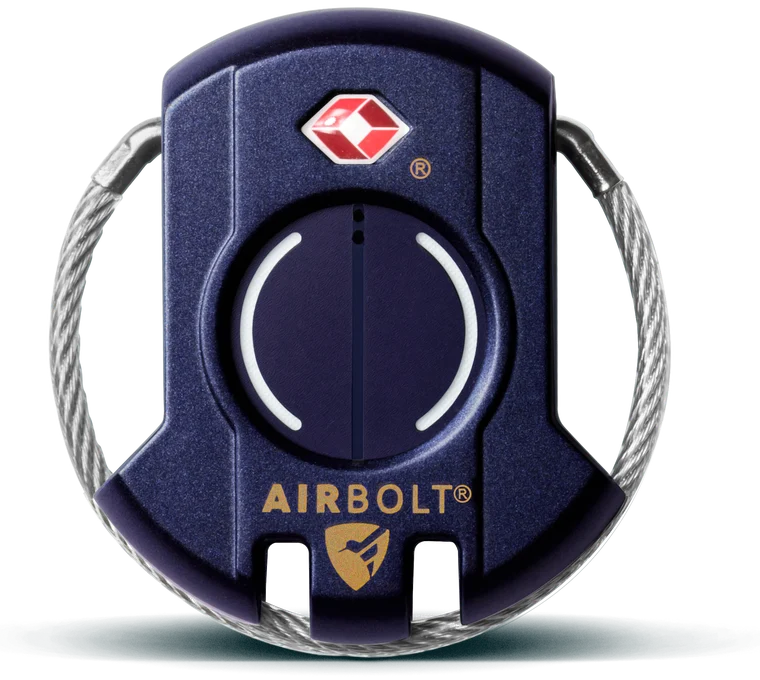
AirBolt Smart Lock Gen 5 in navy, front view
AirBolt Smart Lock Gen 5

What changes.

Today works, but it leans on shared codes and one-by-one setup. Flip between the two to see where the friction goes.

Today

  1. Each AirBolt is added individually to the appSlow to scale
  2. A button unlock code is configured per lock
  3. Lock details and code are stored in ISOTRACK
  4. Locks are sent to the site
  5. ISOTRACK provides the code when access is neededCodes can be known or shared
  6. The user enters the code on the AirBoltNo way to tell which user opened it

Proposed

  1. AirBolts bulk provisioned by serial numberHundreds or thousands at once
  2. Devices synchronised with ISOTRACK
  3. Delivery or task and authorised user ID assigned
  4. Digital access granted automaticallyPer user ID, per lock, per job
  5. Unlock by NFC, NFC + Bluetooth or Bluetooth
  6. Every unlock recorded against the user IDFull audit trail
  7. Job completes and access is revokedNo lingering permissions

The end-to-end journey.

Eight stops from a box of locks to access that switches itself off. Click any stop, or use the arrow keys.

    Three ways to unlock.

    The difference is the experience in the hand. Pick a method and run it — the permission check against the user ID is the same every time.

    Your locks in ISOTRACK
    AirBolt 12345Delivery DL-4471, access until 11:00 AM

      Same controls under all three: Access per user IDTemporary permissionsAutomatic expiryAudit trailRevocation

      Which user ID, which lock, when.

      Every digital unlock is tied to a user ID, and access ends on its own when the job does.

      Unlock record

      AirBolt
      12345
      User ID
      287
      Access granted
      10:14 AM
      Unlocked
      10:22 AM
      Unlock method
      NFC
      Delivery / job
      ISOTRACK reference
      Access revoked
      11:00 AM

      What ends access?

      Choose a trigger to play out the lifecycle.

      📦Task assigned
      🔑Access granted
      🔓Unlocked
      ✅Trigger fires
      🚫Access revoked

      The button code stays, as a backup.

      The split left and right button sequence remains for emergencies, but each lock gets its own random sequence — set at the factory and pulled into ISOTRACK at provisioning. It can also rotate whenever the lock connects over Bluetooth.

      AIRBOLT

      Each rotation invalidates the previous sequence and updates ISOTRACK, so a sequence that gets out has a short shelf life.

      The short version.

      Move from a shared-code model to digital access tied to user IDs, while keeping the experience on site as simple as tapping a phone.

      Bulk provision›Sync with ISOTRACK›Assign task and user ID›Access granted›Unlock›Event recorded›Task complete›Access revoked Button sequence as controlled fallback

      Spec sheet.

      The AirBolt Smart Lock Gen 5 as it ships today, alongside the NFC model proposed for Cardinal Health.

      AirBolt Smart Lock Gen 5
      Available now

      AirBolt Smart Lock Gen 5

      Bluetooth smart lock with left and right button unlock.

      AirBolt lock form factor shared by the NFC modelShown: Gen 5 form factor
      In development

      AirBolt NFC model

      Same form factor as Gen 5, adding NFC tap-to-unlock and user ID access for ISOTRACK.

      SpecificationGen 5NFC model
      Physical
      ShapeRoundRound
      Dimensions55 mm diameter, 16 mm thick55 mm diameter, 16 mm thick
      Weight60 g (2.1 oz)60 g (2.1 oz)
      MaterialDie-cast zincDie-cast zinc
      Weather resistantYesYes
      ColoursStarlight Blue, Cape Cod Grey, Vienna GreenNew colour options available once MOQ is met
      Power
      ChargingUSB-CUSB-C
      Battery lifeUp to 12 months per chargeTBD Final figure to be confirmed
      Access and unlocking
      Unlock by phone (Bluetooth)YesYes
      NFC tap to unlockNoYes
      NFC tap + Bluetooth unlockNoYes
      Button sequence (left and right)YesYes, as a controlled fallback
      Unique random button sequence per lock—Set at factory, can rotate over Bluetooth
      Lockout after repeated wrong button pressesYes, unblocked via the appYes, unblocked via the app
      Access tied to a user ID with automatic expiry—Yes
      Security and records
      EncryptionAES 128-bitAES 128-bit
      Lock and unlock historyYesYes, per user ID with ISOTRACK job reference
      Separation alertsYesYes
      Platform
      Bulk provisioning by serial number—Yes
      ISOTRACK integration—Yes
      App and web platformiOS, Android and webISOTRACK, plus AirBolt platform
      Travel and compliance
      Travel Sentry / TSA acceptedYes, TSA port can be switched off in the appYes, TSA port can be switched off in the app
      Timed aeroplane modeYesYes
      CertificationsFCC and CEFCC and CE
      Warranty1 year1 year

      Gen 5 specifications are from theairbolt.com. The NFC model uses the same form factor and hardware as Gen 5; final battery life will be confirmed as development completes.